


Last year, I was still writing a set of thin wrappers for each model provider: the authentication headers were different, the streaming fields were different, and I had to manually translate the error codes. Later, I consolidated the calls into BerriAI/litellm, the business code only recognizes the OpenAI format chat.completions. Let me start with the conclusion:Based on my hands-on testing of LiteLLM, after unifying the interfaces for multiple models, I ended up writing half as much vendor-specific adaptation code.—The other half involves budgeting, key rotation, and determining “when not to use a gateway.” This article isAggregate Structure: Starting with LiteLLM, this section consolidates direct SDK connections, native vendor SDKs, and in-house gateways into a single workflow based on “when to switch”; the final two sections cover quick-start setup and key configuration points for the first week, along with troubleshooting common issues.
Scope: What a Unified Interface Solves—and What It Doesn’t
LiteLLM offers two ways to use it: in the Python SDK completion() A single shuttle; or set up a self-hosted AI Gateway (Proxy) that allows any OpenAI-compatible client to base_url Let me explain. The official documentation puts it this way: the application communicates only with the gateway, and the gateway then communicates with over a hundred upstream services. What I’ve really saved isn’t “a few lines of HTTP code,” but rather the effort of maintaining several sets of retry logic, error normalization, and model name mappings.
Suitable for:The team is already using two or more models simultaneously; they want to use virtual keys for budgeting and rate limiting; and they hope that their business code won’t be subject to the same fluctuations as major updates to the upstream SDK.
Not suitable for:You’re locked into a single model and must rely on the latest, proprietary API details from that vendor; you need an embedded path with zero additional latency at the millisecond level (even the lightest gateway still adds one hop); you mistakenly view the gateway as “the entirety of the security perimeter”—you still have to manage keys and guard against prompt injection.
Read the README and docs.litellm.ai First, take a look at: the list of supported providers, the Proxy Quick Start, and the config.yaml file's model_list, virtual keys, and spend tracking. The version and "extras" names are subject to the documentation available on the day of your installation; this article does not specify a specific minor version number.
How to Choose Between Managed and Aggregated Services:If you don’t want to manage anything yourself, managed aggregation services like OpenRouter allow you to access multiple models with a single key—though this means both traffic and billing go through a third party. My take is this: for personal projects or during the prototyping phase, a managed service is the easiest option; for teams that need to manage their own keys, set their own budgets, and keep logs on their own servers, choose the self-hosted LiteLLM. Both use OpenAI-style APIs, and the migration cost isn’t high if you choose the wrong one early on—so start by deciding based on whether “data can leave your premises.”
Project Card
| 项 | Content |
|---|---|
| Warehouse | https://github.com/BerriAI/litellm |
| Document | https://docs.litellm.ai/docs/ |
| Morphology | Python SDK + Self-Hosted Proxy (OpenAI-Compatible) |
| License | Subject to the LICENSE in the repository (please verify again before installation) |
| Suitable for | Unified Access to Multiple Models, Budget/Virtual Keys, Load Balancing, and Fallback |
| Not suitable | Keep up with the latest single-factory exclusive features on day one; an embedded optimal path with zero extra jumps |
Beyond the card, I also ask myself two questions: Is there anyone on the team willing to handle gateway duty? Is there a secure place to store the master key and upstream keys? If the answer to both questions is “no,” it’s more stable to first use SDK mode to unify the interfaces within a single service rather than rushing to deploy a proxy.
Use Cases: Model Cutting and Budgeting
Use Case 1: Modify only the model field for the same business.I assigned "Draft Generation" and "Final Polishing" to two people model_name. The client is always the OpenAI SDK,base_url Point to the local proxy. Switching models no longer requires changing the import statement or the authentication branch. The acceptance test is pretty rudimentary: send a single request for the same prompt and check whether the upstream model name in the response headers or logs matches expectations, and whether the latency is within the self-defined threshold.
Use Case 2: Assign a budget to a virtual key.The official Gateway capabilities explicitly include virtual keys, spend tracking, and the ability to view spending by user or team. I set a lower budget for the “test environment” key and a higher budget—but still capped—for the “batch processing” key. Validation: Intentionally sending requests that exceed the budget should result in rejection or an alert, rather than silently running up the bill. A budget isn’t just a financial formality; it’s a production brake.
Use Case 3: Automatic fallback when the primary model is throttled.In the config's litellm_settings Rige draft Set a fallback to polishIf the main model returns a rate-limiting error or a timeout, the gateway will automatically retry using the fallback model on your behalf, so you don’t need to write a second set of try/except blocks in your business logic. Validation: Replace the main model’s key with a test key that has a very low rate limit, make several consecutive requests, and confirm that the response remains 200 and that the logs show the fallback was triggered. Choose a fallback model that is acceptable in terms of both price and capabilities; otherwise, a single upstream failure could turn into a billing disaster.
These two use cases address “code bloat” and “out-of-control costs”—which happen to be the two things that have annoyed me the most over the past six months. Integrating logging with backends like Langfuse or OTEL is a plus, but there’s no need to fully implement it in the first week; for now, focus on making the model and budget ready for a demo.
Migration sequence: First, implement a bypass; then, switch traffic.Keep the old code path active for one to two weeks. Use LiteLLM to route shadow traffic to the new path and compare status codes, latency, and the quality of sampled responses. During the shadowing phase, only log data—do not alter the results visible to users. If there are significant differences, stop the rollout; don’t force “uniformity” just for the sake of it. My personal workflow is as follows: launch the shadow environment on Monday; on Wednesday, assess the differences to determine whether to route 10% of traffic to it; and on Friday, check the quota to ensure no normal batch runs have been inadvertently affected.
Quick List of Pros and Cons: When to Switch Back to the Native SDK

| Instructions | When will I get it? |
|---|---|
| LiteLLM SDK | Multiple models within a single service; I don't want to manage a proxy for now |
| LiteLLM Proxy | Shared Keys, Budgets, Fallback Mechanisms, and Unified Logging Across Multiple Services |
| Vendor-Specific SDK | Use the exclusive API / fine-grained flow control released just today |
| In-House Gateway | Compliance requirements mandate full in-house control over the code, and there is a dedicated platform team. |
Advantages:OpenAI is compatible and has a low cognitive load; model aliases are easy to implement in a phased rollout; budgets and keys are centralized.
Disadvantages:An additional hop requires monitoring; some upstream feature mappings may experience delays; when all traffic is routed through a single proxy, availability becomes a single point of failure—so you need to set up multiple instances and health checks.
When should I switch back to the native SDK: When a release requires the use of a vendor-specific tool to call fields or batch processing interfaces, and the LiteLLM mapping does not yet cover this, and the business deadline is too tight to “wait for the upstream team to open an issue.” Switching back isn’t a betrayal of the unified interface; it’s acknowledging our limitations. Once the mappings catch up, we’ll migrate back to the gateway.
Calculate the costs first before proceeding with the proxy:Writing half as much adaptation code saves engineers weeks of work; however, the gateway servers and on-call support represent new costs. We’ll only proceed if the net benefit still justifies the investment. When there are only a few hundred calls per week and only one model is used, a direct SDK connection is the more practical choice—tools should adapt to constraints, not follow the hype of high-profile projects.
Installation and Minimum Working Version (Can Be Done Tonight)
According to the official "Getting Started / Proxy" documentation, the simplest approach is as follows: install the package that includes the proxy, write a two-line configuration file, start the service, and make a single request using the OpenAI client.
# Installation instructions are subject to this document; example:
pip install 'litellm[proxy]'   # or uv tool install 'litellm[proxy]'

# Example config.yaml (use environment variables for keys; do not commit them to the repository)
model_list:
  - model_name: draft
    litellm_params:
 model: openai/gpt-4o-mini
 api_key: os.environ/OPENAI_API_KEY
  - model_name: polish
    litellm_params:
 model: anthropic/claude-sonnet-4-5
 api_key: os.environ/ANTHROPIC_API_KEY

litellm --config config.yaml
# Default: :4000, followed by:
# OpenAI (base_url="http://127.0.0.1:4000", api_key="sk-...")
# Only change model="draft" / "polish"
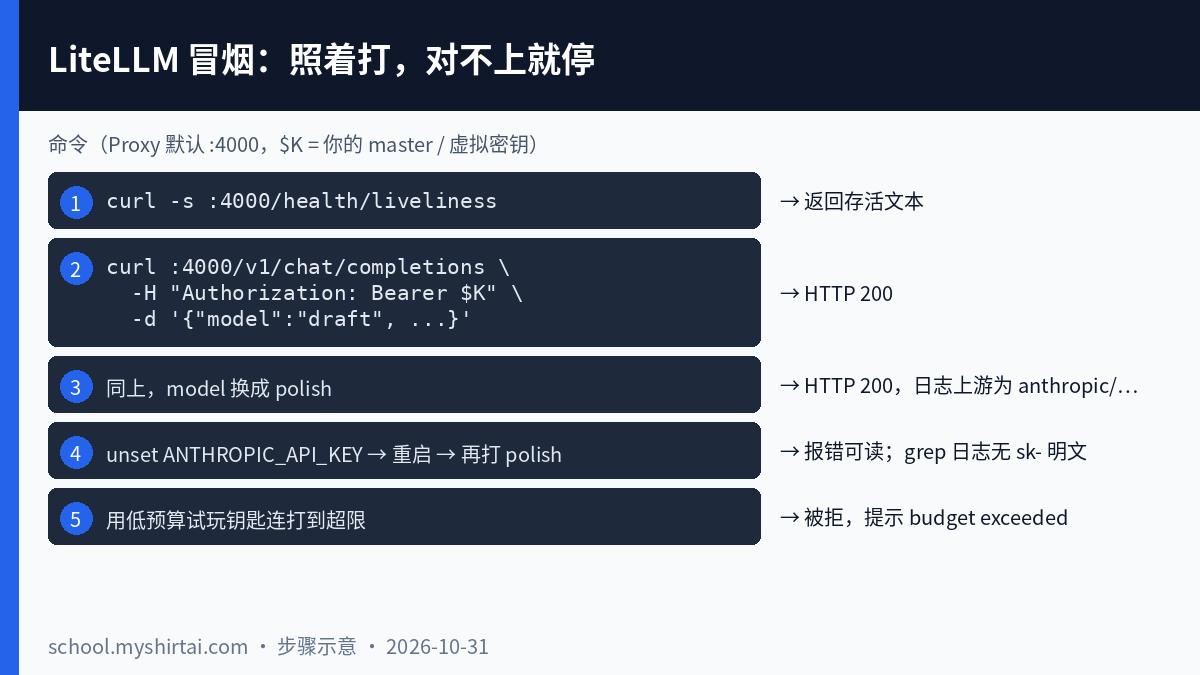
After starting the service, go through the steps shown in the figure above from top to bottom. If any step doesn't match your expectations, stop at that step and don't accept any business for now.Section 4 is the one most likely to be overlooked, but it determines whether logs can be sent directly to colleagues when an issue occurs online. Batch processing only amplifies failures. For teams that have already adopted containerization, use the official Docker image (docker.litellm.ai/berriai/litellm (For certain categories, refer to the documentation for specific labels) to reduce disputes over whether a program "runs on my machine."
If Article 5 doesn't run, check the prerequisites first:Virtual Keys and Spending Statistics Dependencies general_settings the `master_key` in the file and a Postgres database (environment variable DATABASE_URL). If you only write the model list and haven't connected to a database, the key-generation interface will throw an error immediately—this isn't a bug in the logic. For local testing, you can use Docker to set up a temporary Postgres instance; the `master_key` is set to sk- To start, we'll again use environment variable injection and include the following when generating the trial key: max_budget A list of allowed models.
Key Configuration Points and Troubleshooting (Week 1)
Let’s not rush things. In the first week, we’ll focus solely on configuration and finalizing the setup—no new features: virtual keys, guardrails, and load balancing can all be added later once the pre-release is running smoothly.
Key Configuration Points (Follow these instructions):
- Commit the config to Git; inject the key:Include the `config.yaml` file and the injection method in the repository documentation; store the keys themselves in a key vault. To modify the configuration, follow the "commit → rolling restart" process. Once traffic picks up, evaluate hot updates according to the official documentation.
- Keys categorized by use:Trial keys are low-cost, while batch-produced keys are high-cost but capped; a single key doesn't work for everything.
- Include the main model and fallback model in the route:The service only recognizes `model_name`; errors are handled uniformly according to the OpenAI format, and vendor branches are no longer specified.
- Incorporate health checkups into existing outreach activities:Deploy multiple instances—don’t let a single proxy become a single point of failure.
- First, determine which fields should not be published online:For user-provided text, ID numbers, and keys, hash them if possible, or truncate them if necessary; when compliance requirements mandate that data must remain within the private cloud, place the proxy and the logging backend within the same network boundary and do not route traffic to public SaaS services.
- List of exceptions where the "native SDK" is still used, with minor version locked:Before upgrading, read the changelog; run smoke tests on the staging environment first, then scale up.
Troubleshooting (by Symptom):
| Symptoms | Check first | Action |
|---|---|---|
| Budget Rejection Should Not Affect Normal Batch Runs | Was the trial key reused for a batch run task? | Categorize keys by purpose: "Trial" means trial, and "batch run" means batch run; don't immediately think about cutting the budget. |
| Unexplained Shifts in the Gray List | Has anyone ever manually edited the YAML inside a container on the server? | Re-deploy using the configuration in Git; manual changes are prohibited in production. |
| An error occurred after the upgrade, and it's unclear whose fault it is. | Were both the prompt and the gateway version updated at the same time this time? | Roll back the gateway version, rerun the five smoke tests individually, and then scale up traffic. |
| The details of the upstream error are missing. | Do errors in the LiteLLM-mapped response retain the original response? | Write the original error to a structured log field so that only the person on duty can see it |
| Single-Test Invoice Anomalies | Are there any tests in the CI that actually call the paid API? | Unit tests should use mocked dependencies or recorded playbacks; integration tests should only be run in the pre-release environment. |
| A new hire added a model and modified the business logic code. | Is there an explanation for "adding model_name" in the team manual? | Filled in half a page of documentation + one example PR; fixed the documentation on abstraction leaks |
If you could change just one habit: Eliminate from your business logic code import openai 又 import anthropic The dual stack is first incorporated into a single call chain in LiteLLM.
Note: A unified interface reduces integration costs but does not reduce the risk of data leaks; an open-source license allows you to modify the gateway, but does not mean the client permits you to send the original text to a third-party backend. For the latest versions, extras, and the LICENSE file, please refer to the current page at GitHub / docs.litellm.ai; this document does not replace the official documentation.


Comment List (0):
Load More Comments Loading...